



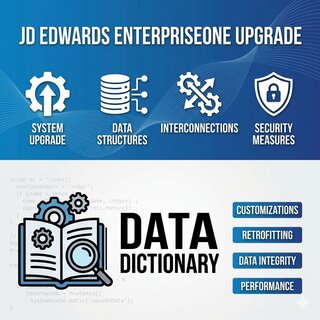
Of all the artefacts that decide whether a JD Edwards upgrade ships on time, the Data DictionaryThe JDE metadata layer that defines every data item — alias, length, decimals, glossary, edit rules. It is the contract every form, BSFN, UBE and integration relies on. is the one most upgrade plans underestimate. The DD is where Oracle's release-to-release changes meet your custom code, and a single decimal-place change on a standard data item, unnoticed during cut-over, has cost more than one finance team a month of reconciliation work after go-live.
This is how I work the Data Dictionary in a real upgrade: how to build the diff between source and target release, how to inventory the custom 55-69 prefix items that will follow you forever, how to spot the silent length and decimal drifts that break retrofittingThe process of re-applying custom modifications on top of a new JDE release, after Oracle has shipped its own changes to the same standard objects., and how to validate the result before the first user logs in.
Why the Data Dictionary is the highest-leverage upgrade artefact
Every form, every UBE, every BSFNBusiness Function: compiled C code that runs inside the JDE Call Object kernel. BSFN structures are built from Data Dictionary item definitions, so any DD change forces a BSFN rebuild. in JDE reads from the DD to know how to interpret the columns of the table it touches. The data is in the table; the meaning of the data is in the DD. When the DD says an item is 15.2 (15 digits, 2 decimals) and the table holds an integer with implied decimals, the application puts the decimal back in the right place at display time. Change the DD's decimal count without rebuilding everything that references it, and the same database row suddenly displays as 100x or 1/100x of its real value.
Across releases, Oracle does change DD items. Lengths widen as the standard product evolves (currency amounts that were 15.2 in older releases moved to 18.2 in some standard tables). Decimal precision changes on rate-like items. Some items are deprecated and replaced by new aliases. None of these are catastrophic if you find them before cut-over; all of them are catastrophic if you find them after.
The leverage point is that DD analysis is cheap relative to the rest of the upgrade. A few well-scoped queries against F9200, F9202, F9203, F9210 against both the source and target releases give you a full picture in hours, not weeks. Skip it, and the same hours come back later as production support tickets — except by then the cost includes the user trust you have already burned.
The five-stage DD workflow I run in every upgrade
The workflow is the same whether you are going from B9 to 9.2 or from 9.2 to a future release. The volumes change; the stages do not.
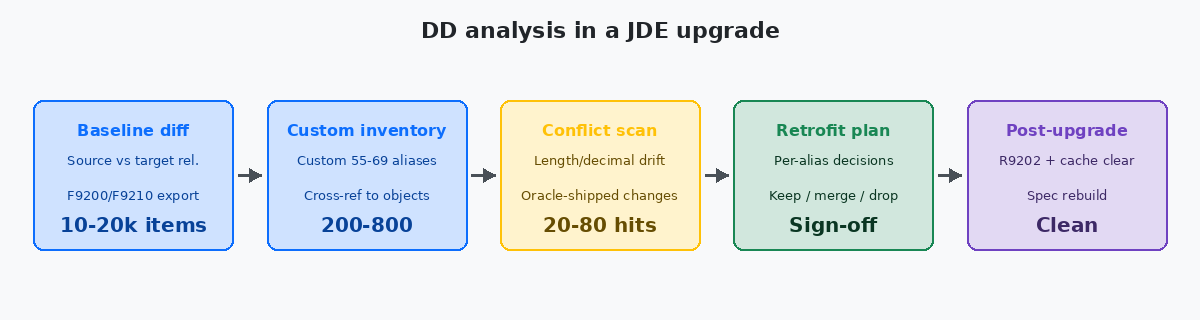
Stage one — baseline diff. Export F9200 and F9210 from the source release and the target release into two side-by-side schemas. A typical JDE instance has 15,000-20,000 DD items, of which roughly 12,000-15,000 are Oracle-shipped and the rest are custom. The diff query is simple — left join on FRDTAI/FROMDTAI, flag any row where length, decimals, or data type differ — but the volume of hits is the surprise. Even between two consecutive ESUs on the same release I have seen 50-150 Oracle-shipped DD changes; between full releases the number is in the low thousands.
Stage two — custom inventory. Every custom DD item should live in the 55-69 alias prefix range. Query SELECT FRDTAI, FRSY FROM F9200 WHERE FRDTAI BETWEEN '55' AND '69' against the source. A healthy custom estate has 200-500 items. Anything above 1,000 is either a long-lived environment that needs cleanup or a sign of someone having created DD items in the wrong prefix range. Either way you want to know before the upgrade, not during.
Stage three — conflict scan. Cross-reference the custom inventory against the Oracle diff. Most of the time custom and Oracle items live in disjoint prefix ranges and there is no collision. The hits to worry about are: custom items that copy or extend a standard item Oracle has now changed, and custom code (BSFNs, NERs, UBEs) that hard-codes a standard alias whose definition has shifted. The second case is the dangerous one because the DD item itself does not need a fix — the code that uses it does.
Stage four — retrofit plan. For each conflict, three options: keep the standard alias as Oracle now ships it and adapt custom code, keep the old custom behaviour and document why, or merge custom into standard if Oracle has now built in what the custom item was added for. Each option goes into the retrofit project plan with effort estimates and a sign-off from a functional owner. Stage four is paperwork — and the paperwork is what saves you in the post-go-live arguments.
Stage five — post-upgrade validation. After the upgrade run, before users log in: run R9202 (Data Dictionary integrity report) on the target release, clear caches top-down from HTML Server through Enterprise Server kernels, rebuild specs for any custom DD items that need it. Spot-check 10-20 high-value items (amounts on F4211, F0411, F0911) with a query that joins the table to F9210 and confirms decimal placement matches what the application is now showing.
The three DD changes Oracle ships that break upgrades
Out of all the things that shift in the DD between releases, three patterns account for nearly every post-upgrade incident I have seen.
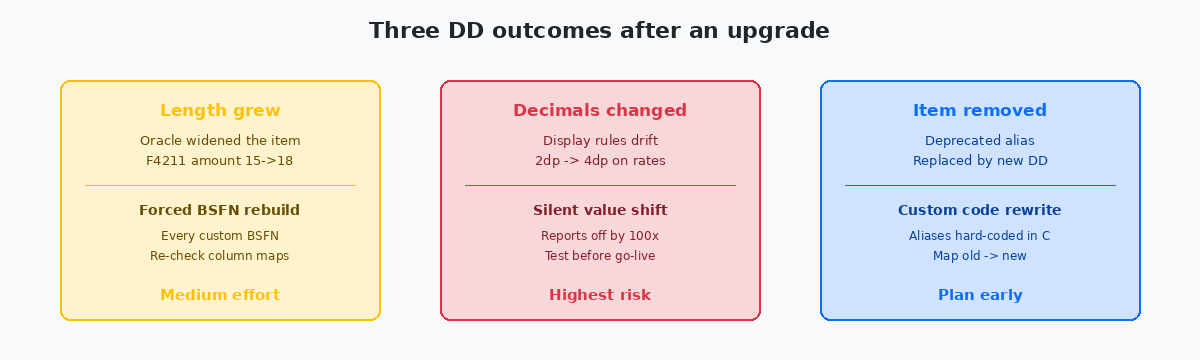
Length grew. Oracle widens an existing item — typically an amount or quantity — to support larger values needed by global customers. The table column is altered to match, your custom BSFNs that allocate a buffer based on the old length still compile but truncate at runtime. The fix is mechanical but exhaustive: rebuild every custom BSFN that references the affected alias. The XREF query (SELECT FOOBNM, FOMODNAME FROM F980011 WHERE FOPONM = 'AMOUNT_ALIAS') gives you the list. Effort scales with custom estate size — a small custom shop is 1-2 days; a heavily customised site can be 1-2 weeks of rebuilds.
Decimals changed. This is the silent killer. Oracle changes a rate-like item from 2 decimals to 4 (or vice versa), the database column does not change, the data does not change, but the application's interpretation does. Every report, every screen, every export now shows the value 100x off. The brutal part: the system does not throw an error. The number renders, formats correctly, looks plausible. Finance only notices when totals stop reconciling. Always include decimal-change items in cut-over UAT with explicit before/after numerical comparison — visual inspection is not enough.
Item removed. Oracle deprecates an alias and ships a replacement, expecting consumers to migrate. The deprecated alias may still be in F9200/F9210 for one or two releases as a courtesy, but new objects use the new alias. Custom code that hard-coded the old alias keeps working until the deprecation window closes, then breaks. Plan the migration during the upgrade itself, not during the release that drops the deprecated row.
Cross-referencing DD items to the objects that depend on them
The DD by itself does not tell you what will break — F980011, the cross-reference table, does. After every checkout that changes DD usage, JDE updates F980011 with the relationship between objects and the DD items they reference. The XREF index is rebuilt by R980011 (or its modern equivalent on current Tools Releases); on a stale index the cross-reference is incomplete and the impact analysis under-counts.
The query that drives the analysis is straightforward:
SELECT FOOBNM, FOMODNAME, FOOBJTYPE
FROM   F980011
WHERE  FOPONM = 'TARGET_ALIAS'
ORDER  BY FOOBJTYPE, FOOBNM;
The output is the complete list of UBEs, APPLs, NERs, and BSFNs that reference the alias, grouped by object type. For an alias used in a dozen objects this is a clean two-hour impact review. For an alias like AN8 (Address Number) — referenced in thousands of objects across the standard product — the list is unreadable as-is and the better approach is to confirm Oracle has not changed the item's definition and move on. AN8 is not changing; the items most likely to change are the ones specific to a functional area.
For high-value DD items (currency amounts, quantities, unit cost, exchange rates) on standard finance and distribution tables, do the cross-reference manually even if the diff says Oracle has not changed them. The 20 most important DD items deserve 20 minutes of attention each — far cheaper than discovering a missed retrofit in week three after go-live.
Tools and scripts that earn their cost on every upgrade
A few targeted tools turn DD analysis from a multi-day grind into a half-day exercise. The shape of these tools is more important than the specific implementation — what matters is that you have them, and that they survive between upgrades to be ready for the next one.
A baseline differ that consumes two F9200/F9210 exports and produces a categorised diff (changes to length, decimals, data type, edit rule, glossary) is the most reused piece. SQL is enough; a 200-line script in Python or pandas gives you spreadsheet-style output that the functional team can review.
A custom-prefix inventory script (the 55-69 query plus cross-reference to F980011) gives you the custom DD footprint per object type. Anything with more than 100 dependent objects gets called out explicitly; anything orphan (DD item with zero F980011 references) gets flagged for cleanup before the upgrade rather than after.
A decimal-change validator runs after the upgrade against high-value tables: for each row in (say) F0911, compute the displayed value using both the old and the new decimal definition, flag any row where the two differ. Run on a sample of 10,000-50,000 rows it takes seconds and gives you a yes/no answer on whether the upgrade has shifted the interpretation of money.
These three tools, combined, turn DD upgrade work into a tractable engineering task instead of a vague "we'll check the DD" line item on the project plan.
The mistakes that quietly extend an upgrade by weeks
The first is treating DD analysis as the CNC team's job alone. The CNC team owns the technical promotion of DD changes through environments; the functional team owns whether a 2dp-to-4dp change on an exchange rate is acceptable for the business. Both teams need to be in the DD review, or the technical sign-off ships changes the business never accepted.
The second is skipping the custom-prefix inventory because "we don't have many customisations". Long-lived JDE environments accumulate custom DD items over the decades — items created by consultants who left, items added for projects that were cancelled, items duplicated because two teams did not know about each other. The first inventory of a 10-year-old environment is invariably a surprise to someone.
The third is doing the diff between source and target releases but not between the current Tools Release and the target Tools Release on the same product release. Tools Releases ship their own DD changes — usually small in volume but high in impact because they touch standard runtime items that every object references. The Tools Release diff is a separate query and a separate review.
The fourth is forgetting that F9202 and F9203 (alpha description and translations) also need an upgrade pass. New DD items shipped by Oracle come with English descriptions and sometimes a subset of language translations. If your environment is multilingual, the post-upgrade gap analysis on F9203 saves users from blank labels on day one.
The fifth is not freezing the DD during cut-over. The window between starting the upgrade and finishing post-go-live validation is no time for someone to add a new DD item "for a quick fix". Lock P92001 down through security, and unlock it only when the upgrade is signed off.
If this kind of upgrade-side analysis is what you need for your own JDE estate, the related articles on this site cover OMW project patterns, custom code analyzer scripts for upgrade scoping, and the retrofit risk dashboard that summarises this kind of work for steering committees. The project portfolio shows where these techniques have been applied to real B9-to-9.2 and 9.2-to-future upgrades.
