



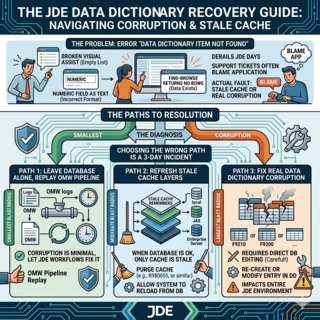
"Data Dictionary Item Not Found" is the error that derails a JD Edwards day fastest. Users see a broken Visual Assist, a numeric field rendering as text, or a Find-Browse that returns nothing where it returned rows yesterday — and the first reflex of half the support tickets I have ever seen is to blame the application, when the actual fault is almost always one layer down: a Data DictionaryThe JDE metadata layer that defines every data item (alias, length, decimals, glossary, edit rules). It governs how every form, BSFN and UBE interprets the underlying columns. entry that no longer matches what one of the four cache layers above it remembers.
This guide is the procedure I use to fix JD Edwards Data Dictionary errors when the corruption is real, when it is just stale cache, and when the safest path is to leave the DB alone and let the OMWObject Management Workbench: the JDE console that tracks check-out, check-in, promotion and audit history for every object change, including Data Dictionary items. pipeline replay the change. The three paths have very different blast radii and the wrong choice turns a 10-minute fix into a 3-day incident.
Why the cache hierarchy is almost always the real culprit
Before touching a single row in F9200 or F9210, internalise this: JDE looks up a data item through four to five cache layers in sequence, and any one of them can be holding a stale copy of the definition while every other layer is correct. The error the user sees is identical whether the corruption is in the database or just in a cache that needs to be flushed.

The fat client, where it still exists, caches DD entries locally inside the workstation spec files. The HTML ServerThe Java-based web server that delivers the JDE EnterpriseOne web interface. It holds per-user and per-environment in-memory caches of frequently accessed metadata, including Data Dictionary items. holds an in-memory JVM cache, refreshed lazily. The Enterprise ServerThe C-based backend that runs Call Object kernels, UBE kernels and other server processes. Its DD cache is held inside each kernel's process memory and is independent of the HTML Server cache. holds its own cache inside each Call Object kernel — and yes, each kernel has its own copy, which is why two users running the same form can see different behaviour. Below that sit the per-path-code spec tables, and below those the central master tables F9200 (Data Item Master), F9202 (alpha description), F9203 (translations), and F9210 (Data Item Specifications).
The practical rule: in roughly 70-80% of the "data dictionary corruption" tickets I have worked, nothing was corrupted. A DD change had been promoted but one of the caches above had not been refreshed, and the application was simply reading an old definition. Clearing caches in the right order resolves the issue in under 10 minutes and does not touch the database.
The remaining 20-30% are real corruption: a row missing from F9210 that exists in F9200, a stale translation in F9203 for a language code no longer active, or a primary key collision after a failed restore. Those need surgical fixes and that is where the next sections matter.
The three repair paths and when to pick each
Once you confirm the problem is reproducible across users and environments — meaning it is not just one stale cache — you have three options. The temptation is always to skip straight to SQL, and that is almost always the wrong call.

Cache clear through Server Manager is the first thing you try, always. Open Server Manager, pick the target HTML Server instance, navigate to Runtime Metrics, and clear the Data Dictionary cache. Then do the same on each Enterprise Server logic kernel that serves the affected users. The whole operation takes 5-10 minutes and changes zero rows in the database. If the symptom disappears, the corruption was never real — it was a cache mismatch — and you are done.
P92001 (Data Dictionary Design) is the standard JDE application for managing DD items. If the cache clear did not help, open P92001 against the offending alias, verify the definition matches what the application expects, and if needed re-save the item. P92001 writes through to F9200/F9210, propagates to the spec tables, and the change becomes part of the OMW audit trail. This is the only repair path that survives an upgrade or an ESU retrofit cleanly, because it leaves a tracked record of who changed what and when.
Direct SQL against F9200/F9210/F9202/F9203 is the last resort. You use it only when P92001 refuses to operate on the row — typically because of an orphaned record, a duplicate that should not exist, or a primary key violation. SQL surgery requires a full backup of the four tables before you start, sign-off from the DBA and CNC team, and an integrity report run immediately after. It is unauditable from JDE's perspective: the change leaves no OMW trace, no version history, no rollback button.
The diagnostic queries that tell you what is actually wrong
Before deciding which path to take, run the four queries that locate the corruption. They take seconds and save hours of guessing.
First, confirm the data item exists in F9200 (master) and F9210 (specifications):
SELECT FRDTAI, FRDSCR, FRSY FROM F9200 WHERE FRDTAI = 'YOUR_ALIAS';
SELECT FROMDTAI, FROOWTP, FROODA FROM F9210 WHERE FROMDTAI = 'YOUR_ALIAS';
If F9200 returns one row but F9210 returns zero, you have a classic orphan: the master exists, the specifications do not, and every form that references the alias will fail. The reverse — F9210 with no F9200 — is rarer but worse, because the spec compiler has something to compile against but the application can never find the master.
Second, check the alpha descriptions in F9202 and translations in F9203 for the languages the site uses:
SELECT FRLNGP, FRALPH FROM F9202 WHERE FRDTAI = 'YOUR_ALIAS';
SELECT FRLNGP, FRALPH FROM F9203 WHERE FRDTAI = 'YOUR_ALIAS';
A missing F9203 row for a user's active language is the single most common cause of "blank label" complaints — the field has a description in English but not in Italian, and Italian users see an empty header. This is almost never "corruption"; it is a translation that was never created.
Third, compare the master against the central spec tables for the active path code. The spec tables live in the path-code-specific data source (DD910, DV920, PY920, PD920 depending on release and path code) and are populated by the package build process. If F9210 says decimals = 2 and the spec table says decimals = 0, the application is reading the spec table — the database master is right, the compiled specs are wrong, and you need a partial package build of the affected DD item, not a database fix.
Fourth, run R9202 (Data Dictionary Repair) as a select against the alias to get a JDE-generated report on the integrity of the four tables. R9202 reports orphans, missing translations, and inconsistent definitions in one output, formatted the way Oracle Support will expect to see them if you escalate.
Cache clear order: getting it wrong wastes the operation
If you decide the issue is cache, the order of operations matters. Clearing the Enterprise Server cache before the HTML Server cache means the HTML Server can repopulate the Enterprise Server cache with its own stale data on the next user request. The correct sequence is top-down: fat clients first if any are involved, then HTML Server, then Enterprise Server kernels, then verify the spec tables are current.
On the HTML Server, Server Manager exposes "Clear Data Dictionary Cache" under the JAS instance's Runtime Metrics. It clears the in-memory JVM cache without restarting the JVM, so users in active sessions are not interrupted. The next DD lookup any user performs pulls a fresh copy from below.
On the Enterprise Server, the cache lives inside each Call Object kernel's process memory. Clearing it requires either restarting the kernel (interrupts in-flight calls) or using the kernel's runtime command interface through Server Manager. In practice, on a busy environment the cleanest approach is a rolling restart of the Call Object kernels — bring down a fraction at a time, let the load balancer redirect, repeat. The whole operation on a 16-kernel setup takes about 8-12 minutes and is invisible to users.
The spec tables (DD3xxxnn-style central spec store) update during package builds. If a DD change was promoted but no package build was run, the spec tables are out of date and no amount of cache clearing helps — the kernels are reading correct cache from incorrect specs. A partial package build of the affected DD item, typically 5-15 minutes depending on environment size, is the fix.
When SQL is unavoidable, the safe procedure
SQL surgery on the F92xx tables is justified only when P92001 refuses to fix the row and the integrity report confirms a real orphan or duplicate. The procedure is:
Step one, full table backup of F9200, F9202, F9203, F9210 in the affected data source, with the date in the backup name. Not a logical export — a CREATE TABLE AS SELECT copy that lets you do row-level comparisons later. Skipping this step is how a 20-minute fix becomes a restore-from-tape situation.
Step two, identify every row touched by the upcoming change. If you are removing one orphan from F9210, query for any related rows in F9202, F9203, and the spec tables that reference the same alias. A clean fix removes related rows in a single transaction; leaving stragglers in F9203 means the next user query for that alias hits a different error.
Step three, the DML inside a transaction with explicit rollback on error. For an orphaned F9210 row with no F9200 master, the safe form is:
BEGIN;
DELETE FROM F9210 WHERE FROMDTAI = 'ORPHAN_ALIAS'
  AND NOT EXISTS (SELECT 1 FROM F9200 WHERE FRDTAI = 'ORPHAN_ALIAS');
-- verify row count matches expectation before commit
COMMIT;
Step four, run R9202 again. The report should now come back clean for the affected alias. If it still reports an issue, roll back from the backup and escalate — you have hit something the simple deletion does not address.
Step five, clear caches top-down (HTML, Enterprise, repeat) and rebuild the affected DD item into the spec tables via a partial package build. Without this, the database is now correct but the kernels keep reading the old broken state from their own cache.
Step six, document the fix in the CNC change log with the alias, the SQL executed, the row counts before and after, and the integrity report output. SQL surgery is unauditable from OMW, so the only audit trail you have is the one you write.
The mistakes that turn a 10-minute fix into a 3-day incident
The first mistake is skipping cache clear and going straight to SQL. Roughly 75% of the time, the user-visible error was never database corruption — it was a kernel reading a stale cache. SQL surgery in that situation does not help, leaves you with an unauditable change to investigate later, and risks introducing real corruption on top of a non-issue.
The second is clearing caches in the wrong order. Clearing the Enterprise Server cache first and then having the HTML Server refresh against it with its own stale copy is a textbook way to spend an hour wondering why nothing changed. Top-down is the rule, every time.
The third is making the change in PD without replaying it through DV and PY first. Even an emergency fix should be applied to DV, verified, then promoted through PY to PD using a tracked OMW project — or at minimum, the SQL replay script should be re-executed against PY and DV after PD is stable. Leaving environments out of sync turns the next upgrade or refresh into a discrepancy hunt.
The fourth is forgetting that DD items are referenced by aliases in compiled C code inside BSFNs. If you change the size or decimals of a DD item without rebuilding every BSFN that uses it, the runtime sees a mismatch between the C structure and the new DD definition. That mismatch can cause hard runtime errors in the Call Object kernel — not as dramatic as the older articles like to claim, but real, and only fixed by a full BSFN rebuild of the affected B-objects.
The fifth is treating F9203 corruption as a database problem. Most "missing translation" tickets are not corruption at all — they are translation rows that were simply never created for the user's language code. The fix is a P92001 update with the missing translation, not a SQL repair against F9203.
If this kind of operational detail is what you need for day-to-day JD Edwards CNC and database work, the related articles on this site cover OMW project patterns, package build internals, and SQL-side optimisations on standard JDE tables. The project portfolio shows where these techniques have been applied to real production support work.
