




"How do I call JD Edwards" is the single most asked question I get from teams building anything that touches the ERP from the outside — a Power Automate flow, a Python script for nightly reconciliation, a React front-end for warehouse staff. In 2026 the answer is no longer "write a custom BSFN wrapper": it is AISApplication Interface Services: the REST gateway shipped with JD Edwards EnterpriseOne that exposes form, data and orchestration services over HTTP. and RESTRepresentational State Transfer: the HTTP-based architectural style used by AIS, where every request is stateless and carries its own authentication., and the choice you make between form services, data services, and orchestrations decides whether your integration survives the next Tools Release.
This is the practical guide to JD Edwards AIS REST integration — how the call lifecycle actually works, when to pick each call type, how authentication and session tokens behave in production, and the failure modes that bite integrators six months in.
Why AIS replaced everything that came before it
Before AIS, integrating with JD Edwards meant one of three painful options: writing a custom BSFNBusiness Function: compiled C code that runs inside the JDE Call Object kernel and exposes JDE business logic to internal callers. wrapper and calling it via the proprietary JDENet protocol, building a Z-file flat-file interface, or using the old XML Interop layer that nobody enjoys touching. All three coupled the external system tightly to JDE internals, and all three broke on Tools Release upgrades roughly every 18 months.
AIS, shipped as a standalone Java server since Tools 9.2, exposes three families of REST endpoints: form services that drive an APPL the way a user would, data services that read or write directly against tables and business views, and orchestration services that bundle a sequence of steps into one stable endpoint. Each one solves a different integration problem, and picking the wrong one is the most common cause of integrations that work in DV and crumble in PD.
The win is not just protocol modernity. AIS sits outside the path code build cycle: a new orchestration goes live without a server package, and the same endpoint runs against DV, PY, and PD by changing one configuration entry. For organisations running multi-site JDE, that alone is worth the migration cost from older interop styles.
The AIS call lifecycle, step by step
Every AIS call follows the same five-stage path, regardless of whether you are reading inventory or kicking off a sales order orchestration:
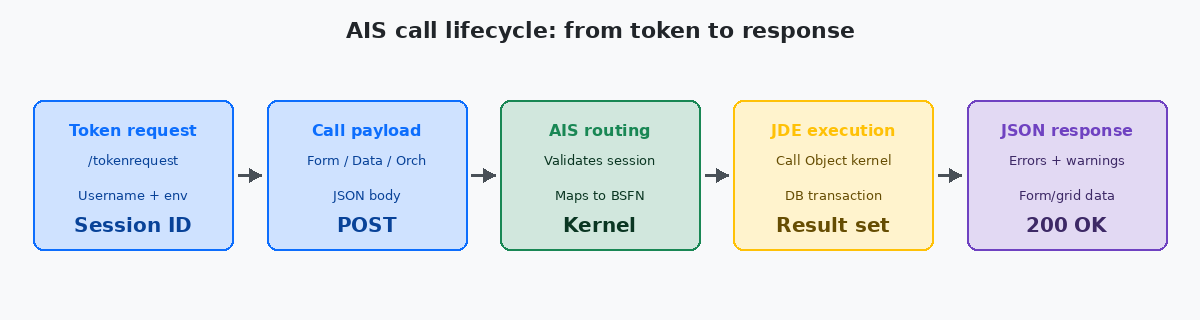
Stage one is the token request. Your client POSTs to /jderest/v2/tokenrequest with username, password, environment, and role. The AIS server validates against JDE security, opens a Call Object session on your behalf, and returns a session token (`jasToken`) plus the userInfo block. This token is good for the configured session timeout — typically 30 minutes idle — and represents an actual kernel slot on the enterprise server. Treat it as expensive: never request a new one per call.
Stage two is the call payload. POST to /jderest/v2/formservice, /jderest/v2/dataservice, or /jderest/v2/orchestrator/<name>. The body is JSON, the structure depends on the call type, and the session token goes in the body (not in a header) for v2 endpoints. The most frequent first-time error is sending the token in Authorization: Bearer, which the v2 API silently ignores.
Stage three is AIS routing. The server validates the token, maps the request to a Call Object kernel, and forwards the call through the standard JDE runtime — the same one used by HTML Server sessions. From here on, the call is indistinguishable from a user-driven transaction: the same record locks, the same processing options, the same event rules fire.
Stage four is JDE execution. The kernel runs the business function chain, hits the database via JDBNET, and assembles the result. This is where you incur most of the wall-clock time — typically 100–800ms for a single form service call on a healthy environment, longer if the underlying APPL has heavy fetch logic or if you are hitting a contended table like F4211 during month-end.
Stage five is the JSON response. AIS wraps the kernel output in a stable envelope: form data, grid rows, errors, warnings, and a refreshed session token. Always read the errors and warnings arrays even on HTTP 200 — JDE returns business errors (insufficient inventory, invalid date format) inside a 200 OK body, not as HTTP error codes.
Choosing between form, data, and orchestration services
The biggest architectural decision in any AIS integration is which of the three call types to use. They look interchangeable in the first demo and are absolutely not interchangeable in production.
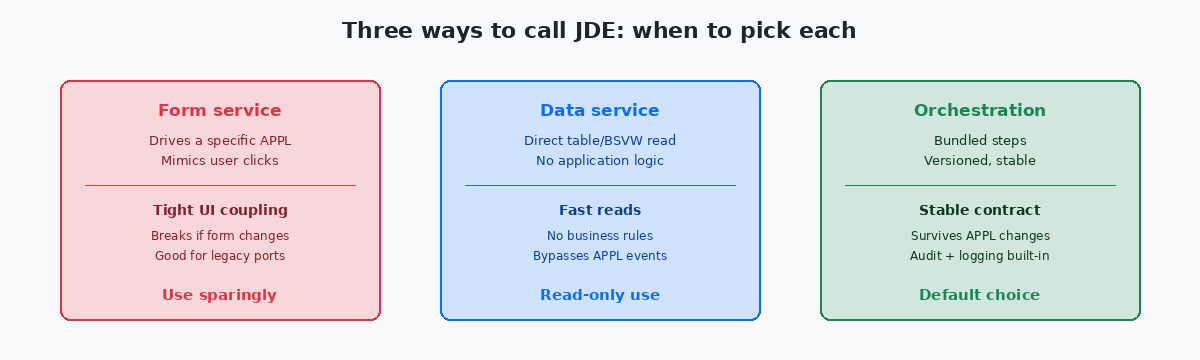
Form services drive an existing APPL exactly as a user would. You specify the form (e.g. P4210_W4210A), the action (Find, Add, Update), and the field values. AIS literally executes the form's event rules end-to-end. The advantage is that all the validation, processing options, and event logic you have built into the APPL run automatically. The disadvantage is that your integration breaks the moment someone changes a form control name, reorders a grid column, or adds a required field. Use form services for one-off ports of legacy interfaces that already mimicked user workflows, not for new integrations.
Data services read or write directly against a table or business view, bypassing the APPL layer entirely. They are fast — typically 30–80ms per call — and ignore event rules, which is both a feature and a trap. For read-only reporting integrations they are perfect. For writes they are dangerous: a data service insert into F4211 does not fire the sales order event chain, so your custom NER that maintains a custom commitment table never runs, and three weeks later finance asks why the commitments are out of sync.
Orchestrations are the default choice for any non-trivial integration in 2026. You build them in Orchestrator Studio, version them like code, and expose them as named REST endpoints. An orchestration can bundle a form service call, a data service lookup, a notification, and a custom Groovy step into one transactional unit. When the underlying APPL changes, the orchestration absorbs the change — your external caller's contract stays stable. Every new integration should default to orchestration unless there is a specific reason not to.
Authentication, session tokens, and the cost of getting it wrong
AIS authentication is straightforward once you understand that the session token represents a real, resource-consuming session on the enterprise server. Each token holds open a Call Object kernel slot. If you build a client that requests a fresh token on every call and never logs out, you will exhaust the kernel pool. On a typical 9.2 environment with the default kernel configuration you have between 50 and 200 concurrent Call Object kernels — burn through them and every JDE user, web client included, starts seeing "no available kernel" errors.
The correct pattern is: acquire one token per process, reuse it for the lifetime of the work, and call /jderest/v2/tokenrequest/logout when done. For long-running services, refresh the token before the idle timeout (usually 30 minutes) by making any cheap call. AIS also supports a poolable session pattern where multiple short tasks share a token — appropriate when your integration is a serverless function that might run hundreds of times an hour.
OAuth 2.0 integration with AIS exists, but it is not a free lunch. AIS still needs a JDE user behind every call — OAuth gets your external user to the AIS gateway, but AIS then maps that identity to a JDE user via the role-based mapping defined in Server Manager. If the mapping is wrong, your OAuth-authenticated user runs as the wrong JDE role and either fails authorisation or, worse, succeeds with elevated privileges. The mapping table is the most overlooked security artefact in AIS deployments.
Service accounts are the practical reality for system-to-system integrations. Create a dedicated JDE user (not a personal account) for each external system, scope its role to exactly what that system needs, and rotate its password through Server Manager every 90 days. Never share a service account across two integrations — when one of them gets compromised or generates audit noise, you need to disable just that one.
Payload structure, error handling, and what AIS does not tell you
The JSON payload for AIS calls is verbose. A form service call to P4210 with five field values is around 1–2 KB of JSON; a data service fetch returning 200 grid rows is 50–150 KB. Most of the volume is structural metadata, not business data. For high-volume integrations measure the actual payload size against your network capacity — a remote site on a 10 Mbps WAN that runs 30 grid fetches per second will saturate the link well before the AIS server feels any load.
Error handling is where most AIS integrations are quietly broken. HTTP 200 does not mean success. Always parse the warnings and errors arrays in the response body. A typical pattern: a sales order add returns 200 OK with an empty errors array but a non-empty warnings array containing "Item not stocked at branch" — the order was created, but with a status that requires manual review. Treating 200 as success and discarding the body loses that signal entirely. Similarly, AIS returns HTTP 400 for malformed requests but HTTP 200 with errors populated for business rule violations. Both need to be handled, in different code paths.
The response envelope changes between v1 and v2 endpoints. v1 (still alive on older Tools Releases) wraps grid data inside fs_FORMNAME.data.gridData.rowset; v2 flattens this to formOutput and gridData. Mixing the two in the same client is the single biggest source of "it worked yesterday" bugs. Pick one version explicitly in your AIS client configuration and stick with it across all integrations on the same environment.
Field types deserve special care. AIS returns dates as JDE Julian (CYYDDD) or ISO depending on the endpoint and the form's data dictionary settings. Numeric fields can come back as strings if the underlying data item has decimal places — JDE stores them as integers and the implied decimal lives in the data dictionary, not in the data. Your client must reapply the data dictionary's decimal placement, or you will silently report values 100x or 1000x off.
The mistakes that break AIS integrations in production
The first failure mode is treating AIS as if it were a stateless web API. It is REST-styled but the underlying JDE runtime is profoundly stateful: locks, processing options cached per session, BSFN-level caches. Two parallel calls with the same token can collide in ways that two parallel calls to a stateless REST service cannot. For concurrent integrations either pool tokens (one per worker) or serialise calls per business key.
The second is ignoring the rate at which AIS forwards calls to the kernel. The AIS server itself can take thousands of HTTP requests per second, but each forwarded call consumes a kernel slot for the duration of the JDE transaction. If your integration pushes 200 sales orders per second through a form service that takes 600ms each, you need 120 concurrent kernels just for that integration — likely more than the entire environment has. Measure end-to-end throughput against actual kernel capacity, not against the AIS HTTP layer.
The third is building orchestrations that call form services internally instead of using data services or custom BSFNs for the parts that do not need APPL logic. A form service call inside an orchestration carries the full event rule overhead — 300–500ms minimum — even when all you needed was a 30ms read. For orchestrations that run thousands of times per hour, mixing call types correctly is the difference between 8-second and 80-second total execution time.
The fourth is leaving orchestrations un-versioned. Orchestrator Studio supports versions for a reason: once an orchestration is consumed by an external system, its request and response contract is part of your API. Editing it in place without bumping the version is how you break every downstream consumer at the same time. Treat orchestration versions the way you treat BSFN signatures.
If this kind of detail is what you need for your current integration work, the related articles on this site cover Orchestrator Studio patterns, BSFN performance measurement, and the SQL-side optimisations that pair with high-volume AIS reads. The project portfolio shows where these techniques have been applied to real ERP integration projects.
