




Changing the index of a BSVWBusiness View: a JD Edwards object that joins one or more tables and exposes a fixed set of columns and a chosen index to applications and reports. looks like a five-minute click-through in BVDABusiness View Design Aid: the JD Edwards tool used to define which table columns and which key the Business View exposes to applications., and that is exactly why it ruins more reports than any other single change in JD Edwards EnterpriseOne. A BSVW is read by potentially dozens of UBEs, APPLs, and form interconnects; flipping its key from index 2 to index 4 in OMWObject Management Workbench: the JD Edwards console that controls check-out, check-in, project tracking, and promotion of objects across path codes. changes the row order every consumer sees, and if even one of them relied on the previous sort, you have just introduced a silent data defect into production.
This is the procedure I use for a JD Edwards BSVW index change with OMW and BVDA — the exact sequence, the dependency check I run before touching the object, and the rebuild path that keeps the change clean across DVDevelopment environment in JD Edwards: the path code where developers check out, modify, build, and unit-test objects before promotion., PYPrototype environment in JD Edwards: the path code used for integration testing and user acceptance before objects are promoted to production., and PDProduction path code in JD Edwards EnterpriseOne. The live environment where business users transact; changes here are deployed via OMW promotion from PY..
Why a BSVW index change is never just a BSVW change
A BSVW does not store data. It is a saved SQLStructured Query Language: the standard language used to query and manipulate relational databases. JDE generates SQL behind every BSVW, fetch, and UBE. definition over one or more underlying tables, with a chosen index that determines two things: the WHERE clause shape and the default ORDER BY. When you change the index from, say, the date-based key to the document-number key, the WHERE clauses the runtime generates change shape, and the order in which rows come back changes with them. Any consumer that was looping through results assuming a date sort is now looping through document-number order, and aggregations, breaks, and "first record wins" logic flip without warning.
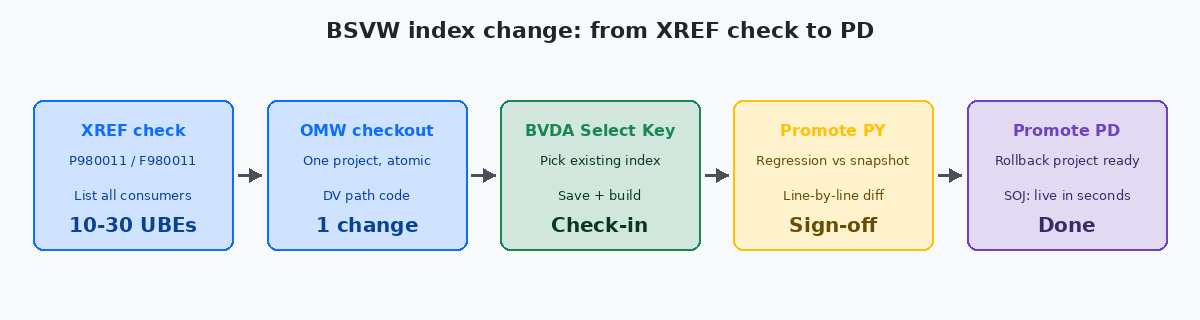
The second issue is consumer count. A single BSVW used in a typical operations environment can feed 10–30 UBEs and 5–15 application forms. The 30-second job of changing the key in BVDA becomes a 3–4 hour job of finding every consumer, opening each one, and confirming none of them depend on the previous sort. Skipping that step is what turns a clean index optimisation into a production incident two weeks later, when month-end aggregation reports start dropping rows in the wrong group.
The third issue is the index has to actually exist on the underlying table. BVDA's "Select Key" dialog lists every index defined on the primary table at data dictionaryJD Edwards Data Dictionary: the central repository of data item definitions (Fxxxx tables, GTxxxx work fields) that governs validation, display, and column metadata. level. If you need a key that does not exist yet, you are not doing a BSVW change — you are doing a table change, which is an order of magnitude more invasive and requires the CNCConfigurable Network Computing: the JD Edwards administration discipline that owns environments, path codes, server packages, and database deployments. team's involvement.
The dependency check I run before touching the object
Before any check-out, run the cross-reference search in P980011Cross Application Reference Repository application in JD Edwards: lets you list every object (UBE, APPL, NER, BSFN) that references a given BSVW, BSFN, or table. against the BSVW name. The output is the complete list of UBEs, APPLs, and NERs that reference it. For each consumer, two questions: does it iterate the result set, and does it have logic that depends on order? If yes to both, that consumer needs to be on the regression list before the change is approved.
A useful shortcut: read the F9860 (Object Librarian Master) and F980011 (XREF) tables directly with a SQL client. A simple query — SELECT FOOBNM, FOMODNAME FROM F980011 WHERE FOPONM = 'V55XXXXA' — gives you the same answer in one second instead of paging through OMW search results. The XREF index has to be rebuilt periodically in JDE; if your last rebuild was months ago, the list is stale and you will miss consumers added recently. Run the XREF refresh first.
For each consumer that depends on order, capture a "before" snapshot. Run the UBE in DV against a frozen dataset, save the output. The same dataset and the same UBE will run again after the change; the diff between the two outputs is your acceptance criterion. Skipping this snapshot is how teams end up arguing with users about whether the report "looks different" — there is no measurement, only opinions.
The OMW and BVDA sequence, step by step
The actual mechanics are eight steps, all in DV, all through OMW:
- Open OMW (P98220W) and locate the BSVW by name (e.g.
V55XXXXA). - Add the object to an active OMW project. If you do not own a project, create one; do not check the object out into someone else's project.
- Check out the BSVW. OMW will warn if it is already checked out by another developer — never break that lock without confirming with them.
- Open it in Business View Design Aid (BVDA).
- From the menu: View → Select Table Columns. Confirm the primary table and the column list are exactly what you expect. Do not change column selection in the same checkout as an index change — keep changes atomic.
- View → Select Key. The dialog lists every index defined on the primary table. Pick the new key item. Note the key number you are leaving and the one you are switching to; you will need both for the OMW change log.
- Save and build the BSVW. A BSVW build is fast (seconds), but it has to succeed locally before you can check it in.
- Check in. In the OMW comment, document the old key, the new key, and the consumer count from the XREF search. This is the audit trail that saves you when someone asks six months later why the sort order changed.
If the build fails, the cause is almost always that the column list still references a column that does not exist on the new key's table — typical when the primary table was changed in a previous checkout and not committed cleanly. The fix is to revert, not to force.
When the index you need does not exist yet
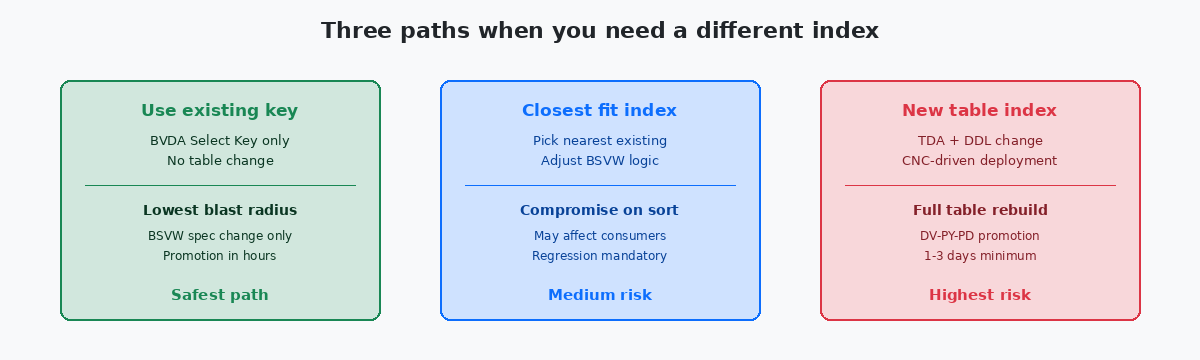
If "Select Key" does not show the index you need, you have two options, and they have very different blast radii. Option one: pick the closest existing index and accept the trade-off. Option two: create a new index on the table itself. The second option means a table change, and a JDE table change is fundamentally different from a BSVW change.
A table change touches TDATable Design Aid: the JD Edwards tool used to define table columns, indexes, primary keys, and to generate the DDL that creates or alters the physical database table. (Table Design Aid), generates a new DDL, and requires the database to be physically rebuilt or altered in every environment. The new index has to exist in DV, PY, and PD before any BSVW or UBE pointing at it will work. The deployment is owned by CNC, not by the developer who needs the index. Plan for a server package generation and deployment cycle of typically 1–3 days depending on the environment's release calendar.
The other risk is that adding an index to a standard JDE table (e.g. F4211, F0911, F4101) is something Oracle support will discuss with you if a future ESU touches the same table. You are not changing schema columns — you are adding an index — but the impact on insert/update throughput on a high-volume table is real and measurable. Adding an index to F4211 in a distribution shop pushing 100,000 sales order lines a day is a CNC conversation, not a developer-only decision.
If you do go down this path: check out the table in OMW, open TDA, add the index with columns in the exact order required by the WHERE clause shape you want, save and build, then promote through the standard path codes. Only then can the BSVW be modified to use it. Two separate OMW projects, two separate check-ins, two separate deployment windows.
Building and deploying the change across DV, PY, PD
Once the BSVW is checked in to DV, the change is not visible to anyone except a developer testing in DV. To make it reach end users, the OMW project has to be promoted: DV → PY → PD. Each promotion needs a CNC-driven server package build for the target path code. A BSVW alone does not require a full package build if you are using specs over JavaSOJ (Specs Over Java): the JDE deployment mode where object specs are served from the deployment server rather than embedded in a full client package, removing the need for a full package build on each change. (SOJ) — that is one of SOJ's main benefits, and it is the default on every modern Tools Release.
On SOJ-enabled environments, the BSVW spec is picked up from the central spec store as soon as the OMW promotion lands. The change is live for the target path code immediately. On a non-SOJ deployment (rare on current Tools Releases but still present at some sites), a full client package build and deployment is needed before the change is visible — a 30–60 minute build window depending on the environment size.
The regression test happens in PY, not in DV. PY has production-shaped data volumes and the actual consumer UBEs scheduled the way users run them. Run each consumer on the regression list against the frozen snapshot taken before the change. Compare line-by-line. Only after every consumer matches expectations does the change get the green light for PD.
In PD, the deployment window is whatever your change-management policy says it is. The BSVW change itself takes seconds to land. The risk is not the deployment — it is the first UBE that runs after deployment showing a result no one expected. Have the rollback OMW project ready: a second project that holds the previous BSVW spec, checked in but not yet promoted, so a CNC engineer can demote in minutes if a user reports a regression in the first hour.
The mistakes that break this procedure in practice
The most common failure mode is skipping the XREF step. A developer changes the key in BVDA, builds, promotes, and only finds out two weeks later that a month-end UBE was relying on the old sort. By then, an entire month of reports has been issued with the wrong row order, and reissuing them is a finance conversation, not a development one.
The second is bundling a key change with a column change in the same checkout. When something breaks, you cannot tell which change caused it. Atomic checkouts are not bureaucracy — they are how you keep the rollback story simple. One change per checkout, one OMW project per change.
The third is creating the new index on a standard JDE table without consulting CNC. A custom B55-prefixed table is your developer estate; F4211 is not. Adding an index to a standard table without a CNC sign-off is a route to having that index silently dropped during the next ESU application, or worse, a production performance issue on a code path you did not measure.
The fourth is treating BSVW promotion as a pure developer task. On SOJ environments the click is small, but the change reaches every UBE consumer the instant the spec lands. There is no soft-launch. The discipline that makes this safe is the regression list and the frozen-dataset snapshot, not the OMW UI itself.
If this kind of procedural detail is what you need for day-to-day JD Edwards operations work, the related articles on this site cover SQL data analysis on standard and custom tables, BSFN performance measurement with logs and timings, and the OMW project patterns that make multi-developer environments safe. The project portfolio shows where these techniques have been applied to real upgrade and retrofit work.
