


What a Custom Code Analyzer actually is
Strip the marketing connotation and what you have is a pipeline that ingests three inputs and produces one output. The inputs are the client's repository (the entire PDProduction environment in JDE — the live one. Its repository is the source of truth for what custom objects actually exist on the client side. path code or equivalent), the Oracle baseline at the source release, and the Oracle baseline at the target release. The output is a per-object verdict: keep, drop, retrofit, rewrite.
The arithmetic is unforgiving. On a mature installation the client's repository contains a long tail of objects that are technically custom but functionally dead — copies of standard never deployed, prototypes from a 2014 proof of concept, BSFNs cloned during a UDC investigation in 2017. Such an analyzer lets none of that reach the development phase. It applies a smart filter first, and only what survives the filter is allowed to consume engineering hours.
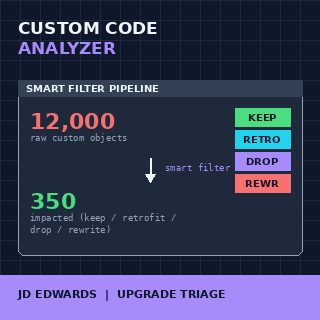
The verdict per object is what makes the concept worth a name. Without it you treat all 12,000 objects as work; with it you treat 350 as work and the rest as backup-and-restoreStrategy where unmodified custom objects are preserved through the upgrade by simply being copied over, with no analysis or retrofit work.. Same upgrade, sixth of the budget.
Why the term sounds like a tool
Because two or three vendors at OpenWorld a few years back started pitching products with names that include the words analyzer and code and JDE. They are real products, some of them good, none of them magical. What every one of those products implements internally is the same conceptual pipeline I described above — repository diff, fingerprinting, classification — wrapped in a UI.
The confusion this creates is expensive. A CIO hears the phrase and assumes the team is shopping for a SKU. The team starts comparing license fees and missing the point: the value is in the discipline, not the wrapper. A spreadsheet operated by a senior consultant who has done eight 9.1-to-9.2 upgrades will outperform a six-figure license operated by someone who has done none. The tool is downstream of the method.
Treat the discipline the way you treat continuous integration. Nobody asks "which CI should I buy?" without first agreeing on what CI means. Same here. Decide on the method first, then choose whether to implement it with a script suite, an Oracle partner offering, or one of the licensed tools — in that order.
The smart filter: where 95% of the work disappears
The first stage of any analyzer worth the name is the smart filter, and it is where every project either saves itself or wastes its budget. The filter works on a single principle: an object is only worth analyzing if both the client modified it AND Oracle modified it between the source and target releases.
Run that test against a typical 12,000-object repository and roughly 70% are removed immediately as obsolete or duplicates — the dead-tail of cumulative customization. Of the surviving 30%, the vast majority were touched by the client but not by Oracle in the version delta, which means the client's modifications carry forward unchanged with no retrofit work. Of what remains, only 200 to 500 objects fall into the genuine intersection: client-modified AND Oracle-modified. Those are the impacted objects, and those are what your developers actually work on.
The filter rules sound simple. They are not, because each one needs an exception list. UBEUniversal Batch Engine — the JDE batch report runner. Custom UBEs are common because every client has its own reporting needs. versions are filtered differently from underlying UBE templates, UDCUser Defined Code — the JDE term for code/lookup tables. UDC additions almost never need retrofit because Oracle does not own the namespace. additions almost never need retrofit, business view modifications follow a different path from the views themselves. Getting these rules right is the entire skill of the discipline.
Fingerprinting: how you know what really changed
The smart filter tells you which objects to look at. The fingerprint tells you what is actually different inside them. This is the part most teams skip and pay for during testing.
A naïve diff compares the client's BSFN against the target Oracle BSFN and reports every line that differs. This produces noise that drowns the signal: a custom variable rename shows up the same as a logic change. A fingerprint-based comparison is structural — it canonicalizes the code, removes formatting differences, normalizes variable names within a scope, and produces a hash of the semantic shape. Two objects with the same fingerprint are functionally equivalent even if they look different in the editor.
The practical consequence: with fingerprinting you can tell, in a single pass, the difference between a real conflict (Oracle changed logic A, client changed logic A, the two changes interact) and a phantom conflict (Oracle reformatted, client renamed a variable, no actual interaction). Real conflicts get a developer; phantom conflicts get auto-resolved. On a recent retrofit pass we saw the phantom-to-real ratio land near three-to-one, which is the difference between three weeks of dev time and one.
Classification: the verdict per object
Once you know what changed, you classify. Every surviving object lands in exactly one of four buckets, and the bucket dictates the work. The classification stage is what closes the loop and turns the analysis into a project plan.
The four verdicts are: keep (object is custom but the Oracle baseline did not change in the delta — carry it forward, no work), drop (object was custom but the Oracle equivalent in the target release covers the same functionality — delete the custom one and use Oracle's), retrofit (Oracle changed it, the client changed it, the changes are compatible — merge), and rewrite (the changes conflict, or the customization assumes runtime behavior that the new Tools Release no longer provides — start over).
The drop bucket is the one teams undervalue. Every release Oracle absorbs functionality that customers built custom in earlier versions: an Orchestrator now does what a custom BSFN did, a standard UDO replaces a custom form extension, an AIS endpoint replaces a custom interface. An analyzer that does not check the target release for built-in equivalents leaves money on the table — you retrofit code that should have been deleted. Going from 9.1 to 9.2.7, on a mature installation, the drop bucket typically accounts for 10 to 20% of the surviving objects.
What lives upstream and downstream
The pipeline does not exist in isolation. Upstream of it sits the Planner ESUThe special ESU that updates the planner schemas before any other ESU can be applied. It is the foundation of the upgrade process. and the snapshot of the source environment — without a clean snapshot the analyzer has no reliable input. Downstream of it sits the development phase, then the regression test pass, then the cutover.
The artifact the analyzer hands to the dev team is what makes or breaks the next 6 to 9 weeks. A good handoff is a per-object work order: object name, verdict, target Oracle baseline path, identified conflict points, and an estimate. A bad handoff is a spreadsheet of 12,000 rows with a "review needed" column. Teams that get the upstream and downstream connections right finish a 9.1 to 9.2 upgrade in nine weeks of development; teams that get them wrong finish in twenty-six.
One more thing about downstream. The analyzer's output should feed regression test selection too. If the analyzer says only 320 objects were impacted, regression should focus on the use cases that exercise those 320 — not on a six-week full-suite test pass that re-validates 90% of an unchanged system. This is the second place where the discipline pays off, and it is where most CIOs learn that they bought the right method.
What this means for your upgrade plan
If you are scoping a JDE upgrade right now and the proposal in front of you does not describe an analyzer pipeline by some name, the proposal is incomplete. The phrase does not have to appear literally — synonyms like retrofit analysis, customization assessment, or code impact study describe the same discipline — but the four pipeline stages have to be there: snapshot, smart filter, fingerprint, classify.
Ask the partner to walk you through their analyzer on a sample of fifty of your objects. If they can produce a verdict per object in an afternoon, they have the discipline. If they need three weeks and a workshop, they will rediscover it on your time and your money. The difference, on a mature installation with twelve thousand custom objects, is the gap between a nine-week development phase and a six-month one — and that gap is exactly the value the concept exists to capture.
If you want a second opinion on what such a pipeline should look like for your specific repository — the breakdown of your custom estate, the realistic impacted-object count for your delta, and the buckets your retrofit will fall into — book a free consultation. We will walk through your environment together and you will leave with a concrete picture of the work that genuinely lies ahead, and the work you can confidently set aside.