


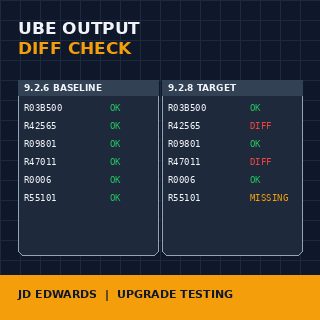
A Tools Release upgrade or a 9.1-to-9.2 jump is signed off as "successful" the moment the new environment passes login. That is the easy part. The hard part — and the part that produces the late post-go-live surprises every JDE installation eventually learns to fear — is JD Edwards EnterpriseOne UBE output validation for upgrade testing. The trial balance that comes out one cent different from the baseline, the invoice register that prints customer names in a slightly different order, the period close that totals correctly but breaks the downstream consolidation feed because two columns swapped position: these are the failures that surface three weeks into PD use, when the people who could have caught them have already moved on to the next project.
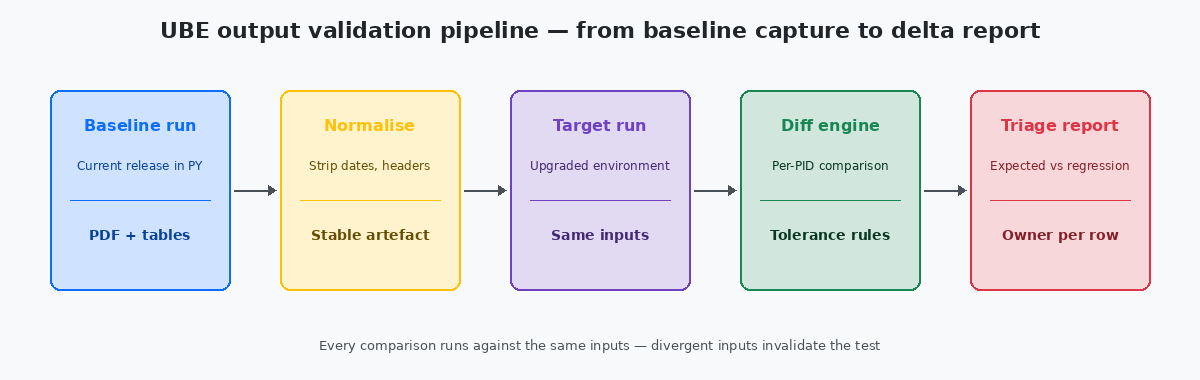
The fix is not more effort or more testers; the fix is a structured comparison pipeline that runs the same UBE against the same inputs on the old release and the new release, normalises the outputs, and tells the team in minutes which jobs are unchanged, which differ for known reasons, and which differ for reasons that need investigation.
What "the same output" actually means after an upgrade
The first trap on every upgrade testing project is treating "same output" as a binary check. It almost never is. A UBE PDF that contained "Run Date: 2024-09-15" in its header on the baseline run will contain "Run Date: 2024-09-22" on the target run, and a naive byte-level diff will flag every page as different. The same applies to the JOBNBR header, the printed user name, the server name embedded in the cover page, and the page numbers that shift if any data row caused a line wrap to fall on a different page boundary.
Useful output comparison treats divergence in three categories. Category one is expected and ignorable — dates, job numbers, server identifiers, generation timestamps. Category two is expected and intentional — changes the upgrade is supposed to introduce, such as a new column added by an Application Update or a relabelled field after a spec merge. Category three is unexpected — anything the upgrade is not supposed to touch but which now reads differently.
The validation pipeline's only job is to push every output into one of those three categories with high confidence. Category one is solved by normalisation rules applied before comparison. Category two is solved by a known-changes registry maintained by the team. Category three is what the regression report surfaces, and what the team actually has to investigate.
Building the baseline before the upgrade window closes
A baseline that is captured after the upgrade has already started is no baseline at all. The first discipline is to lock the source environment — typically PYPrototype environment — the JDE testing tier where promoted code is exercised against a near-production data copy before being moved to PD. The natural place to run baseline UBEs because the data resembles production. with a copy of recent production data — and run every in-scope UBE against it with carefully preserved inputs. The PDF outputs go to a versioned folder; the table outputs (where UBEs write to F* tables rather than only producing PDFs) get snapshotted with row counts, sum checks, and a hash of the relevant columns.
The list of in-scope UBEs is itself a deliverable. On a typical mid-sized installation, the full UBE catalogue is 300 to 700 jobs, but the in-scope list for upgrade validation is much smaller — the 40 to 80 reports that the business actually runs regularly, plus the standard financial and operational reports that drive period close. The rule I apply: any UBE that appears in F986110 with a successful run within the last 90 days is in scope; anything older is either dormant or replaced by another mechanism, and the team should confirm before adding it.
The input set for each UBE is the part most often skipped. A UBE has processing options, data selection criteria, and date-driven behaviour. The baseline run must capture all three exactly — processing options saved as a versioned PO template, data selection serialised to a file, and the system date pinned through the UBE's "as of" date when supported. Without this discipline, a "different" output three months later may just be a different input, and the validation effort produces no usable signal.
Normalising the outputs so the diff means something
Normalisation is what separates a working validation pipeline from a noise generator. The pipeline must transform both the baseline and target outputs through the same set of rules before any comparison runs. The rules are not exotic; they are routinely overlooked.
For PDF outputs, the standard normalisation strips the cover page header (run date, JOBNBR, user, server), removes page numbers, collapses repeated whitespace, and replaces the printed system date with a fixed token wherever it appears. On a regulated output where the cover page itself matters — payroll registers, tax forms, audit reports — the cover page is excluded from the body diff and compared separately against a smaller set of rules that the auditors will accept.
For table-output UBEs that write to F-tables, normalisation means projecting the output table to the columns that actually represent business state. Audit columns like USER, PID, JOBN, UPMJ, UPMT, and TDAY are excluded from the diff because they always differ between runs and carry no business meaning in this context. The remaining columns are sorted into a canonical order before the hash, so a UBE that writes the same rows in different physical sequence (which can happen after an index change) still hashes identically.
The normalisation rules themselves live in a single configuration file checked into the upgrade project. Twenty rules cover roughly 90% of UBEs on a typical installation; ten more are usually needed for the UBEs that produce unusually formatted output (custom letters, EDI files, payroll calculation reports). The cost of writing the rules pays back the first time the pipeline runs against a target release and the diff is readable rather than overwhelming.
Running the comparison and triaging the diff
With baseline captured and normalisation rules defined, the actual comparison is the simplest part of the pipeline. A script — usually 200 to 400 lines of Python or shell — iterates the in-scope UBE list, fetches the baseline artefact for each, fetches the target artefact, applies normalisation, and runs the diff. The output is a structured report: one row per UBE, columns for status (match / known-difference / regression), diff size, and a link to the side-by-side view for human review.
The known-changes registry is the file that keeps the report meaningful. For every UBE where the upgrade legitimately changes the output, an entry in the registry says so, with the reason ("Application Update 23 added column COST-CENTER to R09801 output"), and the diff for that UBE is marked known-difference rather than regression. Without this registry, every Application Update produces dozens of false regressions and the team starts ignoring the report — at which point the real regressions hide in the noise.
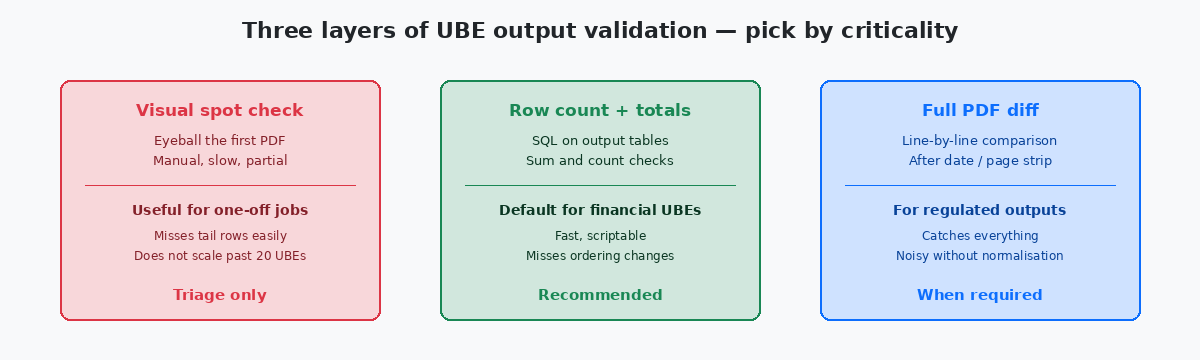
Triage of the regression list goes by criticality. Financial UBEs — period close, trial balance, A/R aging, A/P proof, tax reports — are investigated first and require a named sign-off from finance before the upgrade promotes. Operational UBEs — pick lists, shipment confirmations, work order travelers — come second. Internal management reports come last; some of these may legitimately be deferred to the post-upgrade week if the business agrees in writing.
Closing the loop: when validation is genuinely complete
An upgrade validation effort ends when one document is signed, not when the last UBE has been compared. The document is a regression summary: total UBEs in scope, count that matched exactly, count that matched after known-changes adjustments, count of investigated regressions and their resolutions, and an explicit list of UBEs deferred for post-upgrade follow-up with the business owner who agreed to defer each one.
The signing parties are not the development team. They are the business owners of the affected processes — finance for the financial reports, operations for the operational ones, HR for payroll if it is in scope. The development team prepares the document and produces the evidence; the business signs that they accept the result. Without that signature, the validation is incomplete regardless of how many UBEs were compared.
The artefacts produced by the pipeline — the baseline outputs, the target outputs, the normalisation rules, the known-changes registry, the diff reports — get archived for the lifetime of the upgrade project plus the typical audit horizon (usually seven years for financial outputs). Two years later when an auditor asks "how did you know R09801Post General Ledger — the standard JDE UBE that posts batch journal entries from F0911 to F0902. The most validated UBE on most installations because financial reporting depends on it. produced the same period totals before and after the upgrade?", the answer is a folder, not a memory.
The last operational discipline is to automate the pipeline well enough that it can be re-run for every cumulative Application UpdateThe Oracle continuous-delivery delivery format for JDE 9.2 that bundles standard object changes between major Tools Release cycles. Each one is its own mini-upgrade that benefits from the same validation pipeline., not only the once-every-three-years major upgrade. A pipeline that costs three months to build the first time and one week to run thereafter is the difference between an upgrade-friendly installation and one where every Tools Release decision turns into a board-level question about risk.
For more on the surrounding territory, the related articles on UBE checkpoint and restart patterns, on Tools Release upgrade scoping, and on F986110 archival strategies cover the operational layer this validation pipeline sits on. The technical project portfolio on this site documents two production validation suites that produced the patterns described here.