Select your language



- Details
-
 By Vincenzo Caserta
 - Category: BSFN NER Development
In a mature JDE 9.2 environment, a notable portion of data integrity issues in custom tables stem from "ghost records"—entries where PID is "JDE" or UPMJ is null because audit logic was lost during a migration from APPL events to C Business Functions. While a standard Power Form handles these fields automatically via the runtime engine, a BSFN requires manual population of the USER, PID, UPMJ, and TDAY fields. This guide provides a JDE BSFN audit fields example for updating user, date, and program ID data, focusing on how to correctly populate the record buffer to ensure database integrity.

- Details
- By Vincenzo Caserta
- Category: BSFN NER Development
Every NER saved in the Toolset eventually ends up as a generated .c file in your source directory, yet many architects treat them as a "safe" middle ground without considering the underlying execution cost. The decision regarding JD Edwards NER vs BSFN and when to use each one often boils down to a choice between rapid development and raw execution speed. In high-volume environments—consider a modified R42565 processing 50,000 lines per hour—the incremental overhead of NER’s generated code structure and its redundant variable initializations can bloat a batch window by a measurable margin, often around 15%, compared to a streamlined C implementation.

- Details
- By Vincenzo Caserta
- Category: BSFN NER Development
Developers often burn 40–60 hours of development time chasing "slow" BSFNsBusiness Functions (BSFNs) are reusable pieces of logic in JD Edwards, often written in C, that perform specific tasks like calculating prices or updating inventory. based on subjective user feedback from a Sales Order Entry (P4210)P4210 is the standard JD Edwards application used by sales teams to create, modify, and manage customer sales orders. session. Relying on a manual stopwatch to time a Power FormA type of user interface form in JD Edwards EnterpriseOne, designed for efficient data entry and display, often combining multiple sub-forms. is a mistake when the actual bottleneck might be a 500ms or greater latency spike hidden within the Call Object kernelA server process in JD Edwards that executes business functions (BSFNs) and handles communication between the application and the database. or a poorly indexed custom table. True JD Edwards BSFN performance measurement with logs and timings requires moving beyond the application layer and interrogating the microsecond-level timestamps generated in the jdedebug.logA detailed log file generated by JD Edwards, containing execution traces, SQL statements, and timestamps, crucial for debugging and performance analysis..
- Details
- By Vincenzo Caserta
- Category: BSFN NER Development
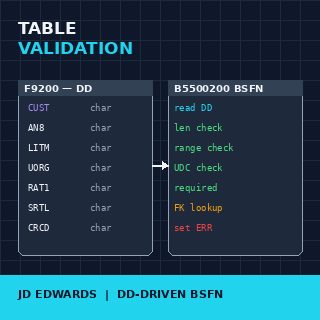
Custom tables in JD Edwards EnterpriseOne — the F55, F56, F57, F58 and F59 namespace — accumulate fast on any installation that takes its business processes seriously. Custom interface tables for partner integrations, staging tables for legacy loads, audit tables, configuration tables, lookup tables that the standard model does not provide. By the third year of a JDE installation a typical shop has 30 to 80 custom tables, and the question of how to keep their contents clean stops being theoretical. JD Edwards BSFN custom table validation with data dictionary items is the discipline that answers it — and the discipline most installations skip, because the standard tooling makes it look optional.

- Details
- By Vincenzo Caserta
- Category: BSFN NER Development
A high-volume UBEAn Oracle JD Edwards EnterpriseOne batch application, used for processing large volumes of data or generating reports without user interaction. processing 50,000 sales lines often wastes 15% to 20% of its execution window on redundant F0101The Address Book Master table in JD Edwards EnterpriseOne, storing core information about customers, vendors, and employees. lookups. Even with optimized database indexing, hitting the same Address Book record 5,000 times in a single batch run creates unnecessary SQL overheadThe additional processing cost incurred by the database system to parse, optimize, and execute SQL queries, beyond just retrieving the data. and middleware latencyThe delay introduced by the software layer (middleware) that connects different applications or systems, impacting data transfer speed.. This JD Edwards BSFN cacheA temporary storage mechanism within a JD Edwards Business Function (BSFN) to hold frequently accessed data, reducing database lookups. example reduces repeated F0101The Address Book Master table in JD Edwards EnterpriseOne, storing core information about customers, vendors, and employees. reads by moving the lookup logic into a local memory segment, bypassing the database layerThe part of a software system responsible for interacting with the database, handling data storage, retrieval, and management. for every request after the initial fetch.

- Details
- By Vincenzo Caserta
- Category: BSFN NER Development
Introduction
JD Edwards offers a powerful process automation capability, including event configuration, actions, and rules for workflow automation. The goal of your article is to guide readers through the process of creating effective Named Event Rules (NER).

- Details
- By Vincenzo Caserta
- Category: UBE Development
Run a simple query against table F983051 in any mature EnterpriseOne 9.2 production environment, and you will routinely count upwards of 10,000 batch versionsPre-configured operational parameters for running JD Edwards reports or background jobs.. Most are operational deadweight: ad-hoc copies generated by users in production or developer prototypes pushed upstream without cleanup. When version sprawl goes unchecked, the fallout is immediate and expensive. Blind runtime overrides corrupt ledger integrity, unmonitored data selections bypass data security models, and repository bloat routinely causes batch package builds to fail.
More Articles …
Page 9 of 18